AD采集、串口传输及上位机显示波形
本工程主要实现了AD7606采集到的数据经串口发送到上位机,并在上位机显示波形的功能
1.AD7606串口发送实现
1.1 ad7606驱动
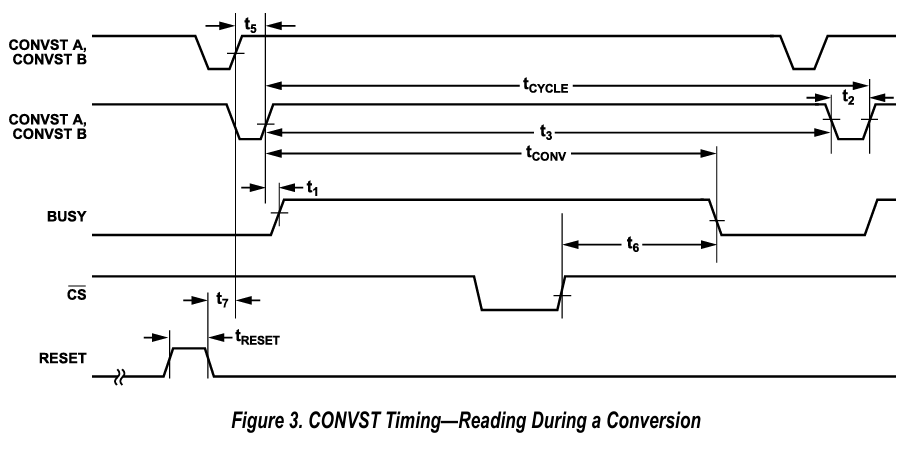
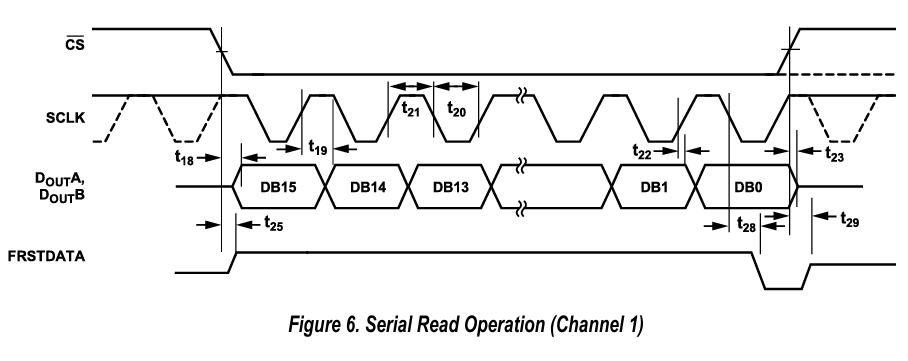
根据时序图来进行SPI通信:
转换时序图:
ADC SPI 时序:
驱动代码:
`timescale 1ns / 1ns
module uispi7606#(
parameter [9:0] SPI_DIV   = 10'd5,
parameter [9:0] T5US_DIV  = 10'd499
)
(
input        	ad_clk_i,
input           ad_rst_i,
input        	ad_busy_i,            //ad7606 忙标志位
output [2:0] 	ad_os_o,              //ad7606 过采样倍率选择
output    	    ad_cs_o,              //ad7606 AD cs
output reg     	ad_sclk_o,            //ad7606 AD data read
output       	ad_rst_o,           //ad7606 AD reset
output    	    ad_convsta_o,         //ad7606 AD convert start
output    	    ad_convstb_o,         //ad7606 AD convert start
output          ad_range_o,
input           ad_out_a_i,
input           ad_out_b_i,
output reg [63:0] ad_out_a,
output reg [63:0] ad_out_b,
output ad_cap_en
 );

assign ad_range_o = 1'b1; //±10V真直流输入范围
assign ad_os_o    = 3'b000;  //无过采样

//ad复位时间高电平
reg [23: 0] rst_cnt;
assign ad_rst_o   = !rst_cnt[23];
always@(posedge ad_clk_i)begin
    if(ad_rst_i)
        rst_cnt  <= 8'd0;
    else if(!rst_cnt[23])
        rst_cnt  <= rst_cnt + 1'b1;
end

//设置采样频率
reg [9:0] tcnt5us;
wire cycle_end = (tcnt5us == T5US_DIV);
always@ (posedge ad_clk_i)begin
     if(ad_rst_o)
         tcnt5us <= 10'd0;
     else if(tcnt5us < T5US_DIV)
         tcnt5us <= tcnt5us + 1'b1;
     else
         tcnt5us <= 10'd0;
end

parameter [9:0] SPI_DIV1    = SPI_DIV/2;
reg [9:0] clk_div = 10'd0;

always@(posedge ad_clk_i)begin
    if(clk_div < SPI_DIV)
        clk_div <= clk_div + 1'b1;
    else
        clk_div <= 10'd0;
end
//产生SPI时钟
wire clk_en1 = (clk_div == SPI_DIV1);//n
wire clk_en2 = (clk_div == SPI_DIV);//p

always@(posedge ad_clk_i)begin
     if(clk_en2) ad_sclk_o <= 1'b1;
    else if(clk_en1) ad_sclk_o <= 1'b0;
end

//AD转换状态机
reg [1:0] AD_S;
reg ad_convst;
assign ad_cs_o = ~((AD_S == 2'd3)&&ad_busy_i);
assign ad_convsta_o = ad_convst;
assign ad_convstb_o = ad_convst;

always @(posedge ad_clk_i)
begin
    if(ad_rst_o||ad_rst_i)begin
        ad_convst <= 1'b1;
        AD_S <= 2'd0;
    end
    else begin
        case(AD_S)
        2'd0:if(clk_en2)begin
             ad_convst <= 1'b0;
             AD_S <= 2'd1;
        end
        2'd1:if(clk_en2)begin //延迟60ns,开始计时
             ad_convst <= 1'b1;
             AD_S <= 2'd2;
        end
        2'd2:if(clk_en2&&ad_busy_i)//延迟60ns,busy 肯定为高
             AD_S <= 2'd3;
        2'd3:if(cycle_end)//等待转换结束
             AD_S <= 2'd0;
        endcase
     end
end

//SPI采样
reg [7 : 0] nbits;
wire ad_cap_en_r1 = (nbits==8'd64);
reg  ad_cap_en_r2 = 1'b0;
assign ad_cap_en = ({ad_cap_en_r1,ad_cap_en_r2}==2'b10);

always@(posedge ad_clk_i) begin
    ad_cap_en_r2 <= ad_cap_en_r1;
end

wire cap_en  = (!ad_cs_o)&&clk_en1&&(nbits<8'd64);
//read spi adc data
always@(posedge ad_clk_i) begin
    if(ad_rst_o) begin
        ad_out_a <= 64'd0;
        ad_out_b <= 64'd0;
        nbits    <= 8'd0;
    end
    else if(ad_cs_o)begin
        nbits   <= 8'd0;
    end
    else if(cap_en)begin//read data at sclk falling edge
        nbits    <= nbits + 1'b1;
        ad_out_a <= {ad_out_a[62:0],ad_out_a_i};
        ad_out_b <= {ad_out_b[62:0],ad_out_b_i};
    end
end

endmodule
1.2 UART_tx驱动
module uart_byte_tx(
    input clk,
    input reset,//低电平复位
    input [7:0]data,
    input start,
    output reg tx_out,
    output reg tx_state                //idle1、busy0
    );

    parameter fre_clk   = 50_000_000;       //时钟频率
    parameter fre_baud  = 9600;             //波特率
    parameter time_Mcnt = fre_clk/fre_baud - 1; //每位发送所需要的时间
    parameter bit_Mcnt  = 10 - 1;               //每次需要发送的位数

    reg [31:0]time_cnt;
    reg [3:0]bit_cnt;
    reg [9:0]tx_out_buffer;

    localparam idle=1,
               busy=0;
    //位时间计数器
    always@(posedge clk or negedge reset)begin
        if(!reset)time_cnt<=0;
        else if(tx_state==idle)time_cnt<=0;
        else if(time_cnt == time_Mcnt)time_cnt<=0;
        else time_cnt<=time_cnt+1'b1;
    end
    //位计数器
    always@(posedge clk or negedge reset)begin
        if(!reset)bit_cnt<=0;
        else if(tx_state==idle)     bit_cnt<=0;
        else if(time_cnt == time_Mcnt)begin
            if(bit_cnt == bit_Mcnt)bit_cnt<=0;
            else bit_cnt<=bit_cnt+1'b1;
        end
    end
    //状态切换
    always@(posedge clk or negedge reset)begin
        if(!reset)tx_state<=idle;
        else begin
            case(tx_state)
            idle:begin
                if(start)begin
                    tx_out_buffer<={1'b1,data,1'b0};
                    tx_state <=busy;
                end
            end
            busy:begin
                if((bit_cnt == bit_Mcnt)&&(time_cnt == time_Mcnt))
                    tx_state<=idle;
                else tx_state<=busy;
                end
            default:tx_state<=idle;
            endcase
        end
    end

    always@(posedge clk or negedge reset)begin
        if(!reset)tx_out<=1'b1;
        else if(tx_state == idle)tx_out<=1'b1;
        else
            case(bit_cnt)
                4'd0    :tx_out<=tx_out_buffer[0];
                4'd1    :tx_out<=tx_out_buffer[1];
                4'd2    :tx_out<=tx_out_buffer[2];
                4'd3    :tx_out<=tx_out_buffer[3];
                4'd4    :tx_out<=tx_out_buffer[4];
                4'd5    :tx_out<=tx_out_buffer[5];
                4'd6    :tx_out<=tx_out_buffer[6];
                4'd7    :tx_out<=tx_out_buffer[7];
                4'd8    :tx_out<=tx_out_buffer[8];
                4'd9    :tx_out<=tx_out_buffer[9];
                default :tx_out<=1'b1;
            endcase
    end
endmodule
1.3 功能实现代码
设置状态机,将16位AD采样数据打包为 0x55 高位数据 低位数据 0x55
状态转换为:等待发送使能信号->锁存AD数据->依次发送0x55 高位数据 低位数据 0xAA->等待发送使能信号
实现代码:
`timescale 1ns / 1ns
module ad7606_top
(
input        	sysclk_i,
input        	ad_busy_i,            //ad7606 忙标志位
output [2:0] 	ad_os_o,              //ad7606 过采样倍率选择
output    	    ad_cs_o,              //ad7606 AD cs
output      	ad_sclk_o,            //ad7606 AD data read
output       	ad_rst_o,           //ad7606 AD reset
output    	    ad_convsta_o,         //ad7606 AD convert start
output    	    ad_convstb_o,         //ad7606 AD convert start
output          ad_range_o,
input           ad_out_a_i,
input           ad_out_b_i,
output          card_en,
output          o_tx_out
 );

wire card_en = 1'b1;
wire ad_clk_i,ad_cap_en;
wire clk100M,locked;
assign ad_clk_i = clk100M;
assign ad_rst_i = !locked;
clk_wiz_0  clk_7606_inst(.clk_out1(clk100M),.locked(locked),.clk_in1(sysclk_i));

wire [63:0] ad_out_a,ad_out_b;
//---------------------------------------------------------------------------
uispi7606#(
.SPI_DIV(10'd5),
.T5US_DIV(10'd499)
)
uispi7606_inst
(
.ad_clk_i(ad_clk_i),
.ad_rst_i(ad_rst_i),
.ad_busy_i(ad_busy_i),
.ad_os_o(ad_os_o),
.ad_cs_o(ad_cs_o),
.ad_sclk_o(ad_sclk_o),
.ad_rst_o(ad_rst_o),
.ad_convsta_o(ad_convsta_o),
.ad_convstb_o(ad_convstb_o),
.ad_range_o(ad_range_o),
.ad_out_a_i(ad_out_a_i),
.ad_out_b_i(ad_out_b_i),
.ad_out_a(ad_out_a),
.ad_out_b(ad_out_b),
.ad_cap_en(ad_cap_en)
 );
//----------------------------------------------------------------
reg [7:0]data;
reg start;
wire tx_out,tx_state;
assign o_tx_out=tx_out;
uart_byte_tx#(
    .fre_clk(100_000_000),      //时钟频率
    .fre_baud(115200)            //波特率
)uart_byte_tx_inst0(
    .clk(clk100M),
    .reset(locked),             //低电平复位
    .data(data),
    .start(start),
    .tx_out(tx_out),
    .tx_state(tx_state)         //idle1、busy0
    );

//----------------------------------------------------------------
wire ad_tx_en,ad_cap_en_r1;
reg  ad_cap_en_r2 = 1'b0;

assign ad_cap_en_r1 = ad_cap_en;
assign ad_tx_en = tx_state && ({ad_cap_en_r1,ad_cap_en_r2}==2'b10);
always@(posedge ad_clk_i) begin
    ad_cap_en_r2 <= ad_cap_en_r1;
end

reg [2:0] ad_tx_state;
reg [7:0] ad_buffer_h;
reg [7:0] ad_buffer_l;

always@(posedge clk100M)begin
    if(!locked)begin
        ad_buffer_h <= 8'd0;
        ad_buffer_l <= 8'd0;
        ad_tx_state <= 3'd0;
        start<=1'd0;end
    else begin
        case(ad_tx_state)
        3'd0:begin
                start<=1'd0;
                if(ad_tx_en)begin
                ad_buffer_h <= ad_out_a[63:56];
                ad_buffer_l <= ad_out_a[55:48];
                ad_tx_state<=3'd1;end
             end
        3'd1:if(tx_state)begin
                    data <= 8'h55;
                    start<=1'd1;
                    ad_tx_state<=3'd2;end
        3'd2:begin  start<=1'd0;
                    ad_tx_state<=3'd3;end
        3'd3:if(tx_state)begin
                    data <= ad_buffer_h;
                    start<=1'd1;
                    ad_tx_state<=3'd4;end
        3'd4:begin  start<=1'd0;
                    ad_tx_state<=3'd5;end
        3'd5:if(tx_state)begin
                    data <= ad_buffer_l;
                    start<=1'd1;
                    ad_tx_state<=3'd6;end
        3'd6:begin  start<=1'd0;
                    ad_tx_state<=3'd7;end
        3'd7:if(tx_state)begin
                    data <= 8'hAA;
                    start<=1'd1;
                    ad_tx_state<=3'd0;end
        default: ad_tx_state <= 3'd0;
        endcase
    end
end

endmodule
2.上位机串口显示程序
运行结果图: 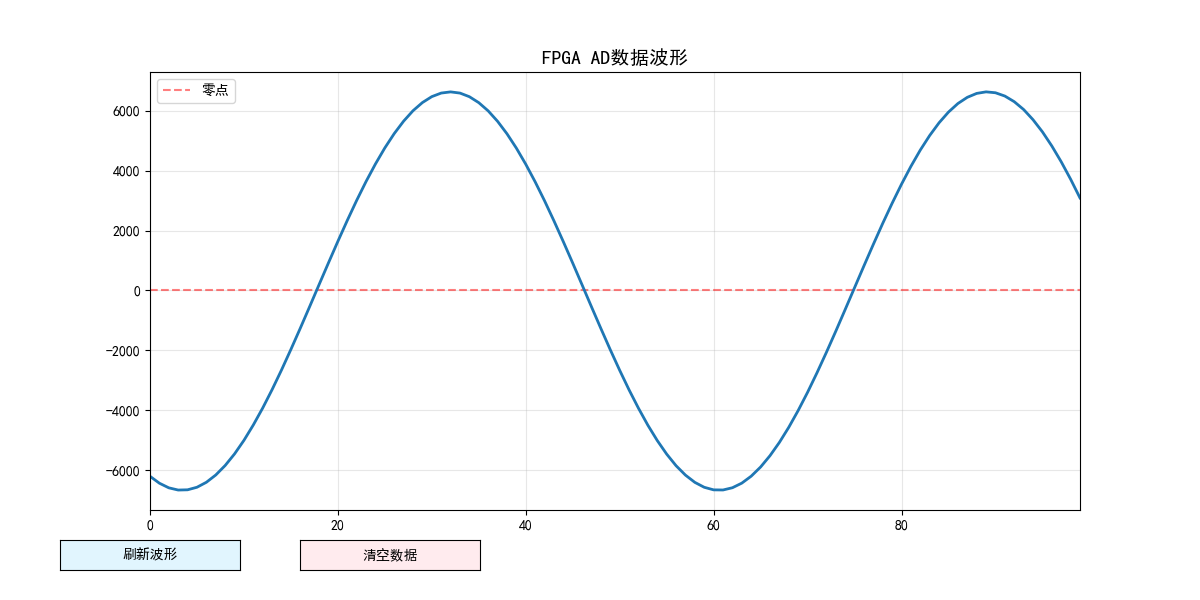 上位机程序:
# cspell:disable                            # 禁用拼写检查(避免注释/变量名被误判为拼写错误)
import serial                               # 串口通信核心库
import serial.tools.list_ports              # 串口辅助库:用于自动查找电脑上的可用串口
import matplotlib.pyplot as plt             # 绘图核心库
import numpy as np                          # 数值计算库:快速处理数组
from matplotlib.widgets import Button       # 绘图控件库:添加手动操作按钮

# -------------------------- 配置参数(根据实际情况修改)--------------------------
SERIAL_PORT = "COM11" # 串口号
BAUD_RATE = 115200    # 波特率
DISPLAY_POINTS = 100  # 波形显示的最大点数
FRAME_HEADER = 0x55   # 帧头
FRAME_TAIL = 0xAA     # 帧尾
# --------------------------------------------------------------------------------

# 全局变量:存储接收的数据和串口对象
received_data = []  # 存储合并后的有符号16位数据
serial_obj = None   # 串口对象
frame_buffer = []   # 帧缓冲(用于拼接完整帧)
line = None         # 波形线条对象(全局存储,方便刷新)
ax = None           # 坐标轴对象(全局存储,方便更新)
y_data = None       # y轴数据数组(全局存储,避免重复创建)

def find_serial_port() -> str:
    """自动查找可用的串口(可选,用于快速定位串口号)"""
    ports = list(serial.tools.list_ports.comports())
    for port in ports:
        if "USB" in port.description or "UART" in port.description:
            print(f"自动检测到串口:{port.device}")
            return port.device
    return SERIAL_PORT  # 未检测到则使用配置的串口号

def init_serial() -> bool:
    """初始化串口"""
    global serial_obj
    try:
        serial_obj = serial.Serial(
            port=find_serial_port(),
            baudrate=BAUD_RATE,
            parity=serial.PARITY_NONE,
            stopbits=serial.STOPBITS_ONE,
            bytesize=serial.EIGHTBITS,
            timeout=0.1
        )
        if serial_obj.is_open:
            print(f"串口 {serial_obj.port} 打开成功!")
            print("操作说明:")
            print("  1. 点击「刷新波形」按钮:手动更新当前最新数据")
            print("  2. 按下键盘「R」键:快速刷新波形(无需点击按钮)")
            print("  3. 点击「清空数据」按钮:重置波形和缓存数据")
            print("  4. 关闭窗口:自动关闭串口,退出程序")
            return True
        else:
            print("串口打开失败!")
            return False
    except Exception as e:
        print(f"串口初始化异常:{str(e)}")
        return False

def parse_frame(raw_data: bytes):
    """解析串口数据,提取“55 xx yy AA”帧并合并为有符号16位整数"""
    global frame_buffer, received_data
    # 将新接收的数据加入缓冲
    frame_buffer.extend(raw_data)

    # 循环查找完整帧(不限定采集数量,持续解析)
    while len(frame_buffer) >= 4:
        if frame_buffer[0] == FRAME_HEADER:
            if frame_buffer[3] == FRAME_TAIL:
                high_byte = frame_buffer[1]
                low_byte = frame_buffer[2]

                # 有符号16位合并(高位在前)
                combined_value = int.from_bytes(
                    bytes([high_byte, low_byte]),
                    byteorder='big',
                    signed=True
                )

                # 滚动存储:只保留最新的DISPLAY_POINTS个点
                received_data.append(combined_value)
                if len(received_data) > DISPLAY_POINTS:
                    received_data = received_data[-DISPLAY_POINTS:]  # 移除最旧的数据

                frame_buffer = frame_buffer[4:]
            else:
                print(f"帧错误:帧尾不是0xAA,丢弃字节 0x{frame_buffer[0]:02X}")
                frame_buffer.pop(0)
        else:
            frame_buffer.pop(0)

def read_serial_data():
    """读取并解析串口数据(后台调用,仅解析不绘图)"""
    global serial_obj
    if serial_obj and serial_obj.is_open:
        try:
            # 批量读取串口缓冲数据
            data_len = serial_obj.in_waiting
            if data_len > 0:
                raw_data = serial_obj.read(data_len)
                parse_frame(raw_data)
        except Exception as e:
            print(f"读取串口数据异常:{str(e)}")

def manual_refresh_plot(event=None):
    """手动刷新波形图(核心函数,支持按钮和快捷键触发)"""
    global received_data, line, ax, y_data
    # 先读取最新的串口数据(确保刷新的是最新数据)
    read_serial_data()

    if len(received_data) > 0:
        # 更新y轴数据(滚动存储,不足补0)
        y_data[:len(received_data)] = received_data
        if len(received_data) < DISPLAY_POINTS:
            y_data[len(received_data):] = 0

        # 更新波形线条
        x_data = np.arange(DISPLAY_POINTS)
        line.set_data(x_data, y_data)

        # 自动适配y轴范围(留10%余量)
        y_min = min(received_data) * 1.1 if received_data else -32768
        y_max = max(received_data) * 1.1 if received_data else 32767
        ax.set_ylim(y_min, y_max)

        # 重绘图像(手动刷新关键步骤)
        plt.draw()
        plt.pause(0.01)  # 暂停0.01秒,确保图像渲染完成
    else:
        print("暂无有效数据,刷新失败!")

def clear_data(event=None):
    """清空缓存数据和波形图"""
    global received_data, frame_buffer, line, ax, y_data
    # 清空全局缓存
    received_data.clear()
    frame_buffer.clear()
    # 重置y轴数据为0
    y_data = np.zeros(DISPLAY_POINTS)
    line.set_data(np.arange(DISPLAY_POINTS), y_data)
    # 重置y轴范围为默认极值
    ax.set_ylim(-32768 * 1.1, 32767 * 1.1)
    # 重绘图像
    plt.draw()
    plt.pause(0.01)
    print("数据已清空!")

def key_press_event(event):
    """键盘快捷键监听:按下R键刷新,C键清空"""
    if event.key == 'r' or event.key == 'R':
        manual_refresh_plot()
    elif event.key == 'c' or event.key == 'C':
        clear_data()

def main():
    global serial_obj, line, ax, y_data
    # 初始化串口
    if not init_serial():
        return

    # 初始化绘图(设置按钮区域,调整布局)
    plt.rcParams['font.sans-serif'] = ['SimHei']  # 支持中文
    plt.rcParams['axes.unicode_minus'] = False
    fig, ax = plt.subplots(figsize=(12, 6))
    # 预留底部空间放按钮(底部10%区域)
    plt.subplots_adjust(bottom=0.15)

    # 坐标轴设置
    ax.set_title(f"FPGA AD数据波形", fontsize=14)
    ax.grid(True, alpha=0.3)
    ax.axhline(y=0, color='red', linestyle='--', alpha=0.5, label='零点')
    ax.legend()
    ax.set_xlim(0, DISPLAY_POINTS - 1)  # x轴固定范围
    ax.set_ylim(-32768 * 1.1, 32767 * 1.1)  # 默认y轴范围

    # 初始化x、y轴数据
    x_data = np.arange(DISPLAY_POINTS)
    y_data = np.zeros(DISPLAY_POINTS)
    line, = ax.plot(x_data, y_data, color='#1f77b4', linewidth=2)

    # -------------------------- 添加手动操作按钮 --------------------------
    # 刷新按钮(位置:底部左5%,宽度15%,高度5%)
    ax_refresh = plt.axes([0.05, 0.05, 0.15, 0.05])
    btn_refresh = Button(ax_refresh, '刷新波形', color='#e1f5fe', hovercolor='#b3e5fc')
    btn_refresh.on_clicked(manual_refresh_plot)

    # 清空按钮(位置:底部左25%,宽度15%,高度5%)
    ax_clear = plt.axes([0.25, 0.05, 0.15, 0.05])
    btn_clear = Button(ax_clear, '清空数据', color='#ffebee', hovercolor='#ffcdd2')
    btn_clear.on_clicked(clear_data)
    # ------------------------------------------------------------------------

    # 绑定键盘快捷键
    fig.canvas.mpl_connect('key_press_event', key_press_event)

    # 显示波形(阻塞窗口,直到关闭)
    try:
        plt.show()
    finally:
        # 关闭窗口时关闭串口
        if serial_obj and serial_obj.is_open:
            serial_obj.close()
            print("串口已关闭,程序退出!")

if __name__ == "__main__":
    main()
本文章使用limfx的vscode插件快速发布