C#动态编译
现在写的项目涉及了在.net standard下的动态编译,这篇文章就是来记录一下实现动态编译的过程。
CodeDom
一开始我使用的是System.CodeDom,在运行时会报错提示平台不支持的错误,在查询后发现.Net Standard不支持System.CodeDom,需要在上面一层建立和Roslyn依赖关系。Roslyn是一种.net 编译器。这一层也有人提供,叫Microsoft.CodeDom.Providers.DotNetCompilerPlatform。但我这次的实现并没有用到这个。
用Roslyn实现动态编译
比起绕来绕去,就干脆直接用Roslyn实现感觉会更有效率。 需要的nuget包:
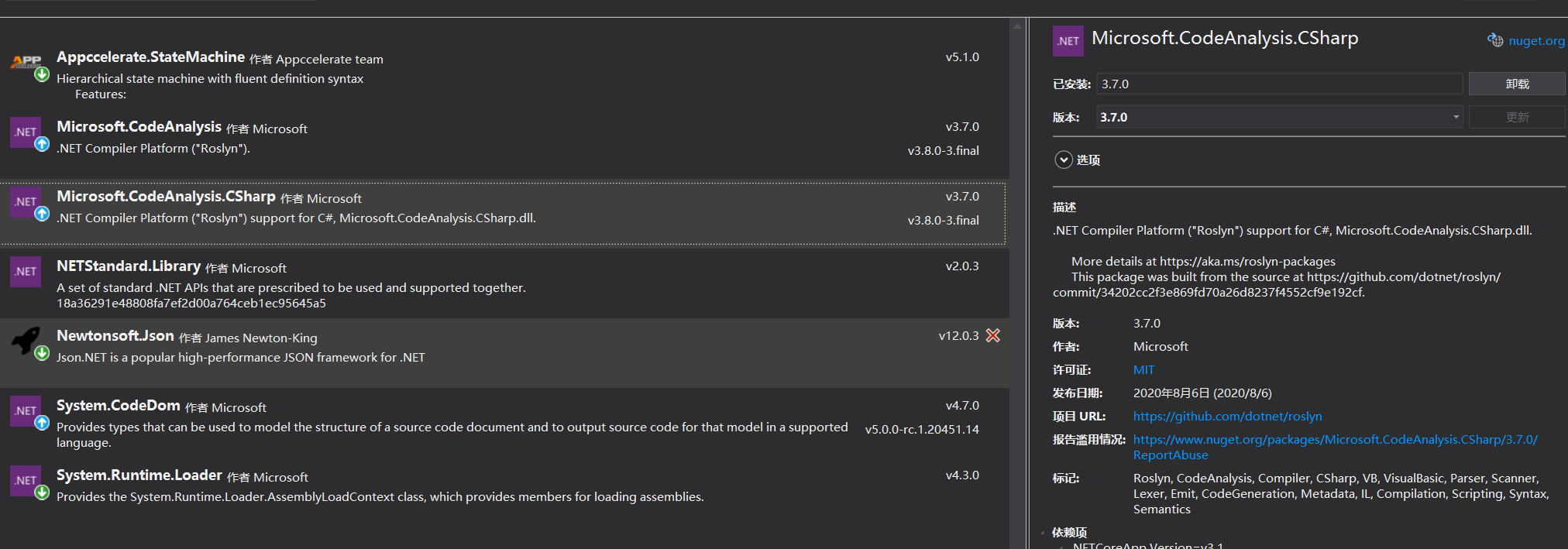
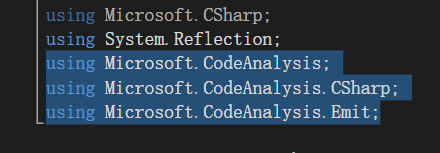
整个动态编译的过程如下:
- 获取需要编译的完整代码 我的代码的内容主要是提供一个判断转换条件,给出转换结果的函数。这里给出一个测试案例对应生成的动态代码。
    using System;
    using System.Collections.Generic;
    namespace Transitions
    {
        public class GetTransitions
        {
            public string getTransition(params object[] Parameters)
            {
                Dictionary<string, object> AliasValue = Parameters[0] as Dictionary<string, object>;
                int stateNo = (int)Parameters[1];
                System.Int32? numA = AliasValue["numA"] as System.Int32?;
                System.Int32? numB = AliasValue["numB"] as System.Int32?;
                System.Int32? numC = AliasValue["numC"] as System.Int32?;
                System.String strD = AliasValue["strD"] as System.String;
                switch(stateNo)
                {
                    case 0:
                        if(numA >10){ return "goB";}
                        if(numA<=10){ return "goC";}
                        else{ return "Default";}
                    case 1:
                        if(numB>10){ return "goD";}
                        else{ return "Default";}
                    case 2:if(numC>10){ return "goD";}
                        else{ return "Default";}
                    case 3:if(strD == "end")
                        { return "goA";}
                        else{ return "Default";}
                    default: return null;
                }
            }
        }
    }
- 获取代码分析得到的语法树
var syntaxTree = SyntaxFactory.ParseSyntaxTree(dynamicCode);
- 加载MetadataReference
    MetadataReference[] references = new MetadataReference[]
    {
        MetadataReference.CreateFromFile(typeof(object).Assembly.Location),
        MetadataReference.CreateFromFile(typeof(Enumerable).Assembly.Location)
    };
- 创建编译任务
    CSharpCompilation compilation = CSharpCompilation.Create(
        assenmblyName, //指定程序集名称
        syntaxTrees: new[] { syntaxTree }, //获取代码树
        references: references, //添加程序集引用
        options: new CSharpCompilationOptions(OutputKind.DynamicallyLinkedLibrary)); //输出为dll程序集
- 将IL代码写进内存
EmitResult result = compilation.Emit(ms);
if (!result.Success) //判断编译是否成功
    {
        // handle exceptions
        IEnumerable<Diagnostic> failures = result.Diagnostics.Where(diagnostic =>
            diagnostic.IsWarningAsError ||
            diagnostic.Severity == DiagnosticSeverity.Error);

        foreach (Diagnostic diagnostic in failures)
        {
            Console.Error.WriteLine("{0}: {1}", diagnostic.Id, diagnostic.GetMessage());
        }
    }
成功了话到这里编译差不多结束,接着就是引用动态代码里的方法
- 获取程序集对象
else
{
    // load this 'virtual' DLL so that we can use
    ms.Seek(0, SeekOrigin.Begin);
    Assembly objAssembly = Assembly.Load(ms.ToArray());
    // create instance of the desired class and call the desired function
    typeDynamicAssenmbly = objAssembly.GetType("Transitions.GetTransitions");
    objDynamicAssenmbly = Activator.CreateInstance(typeDynamicAssenmbly);
}
- 调用方法
var codeParams = new object[] { aliasValue, StatesConfig.CurrentState };
string result =  typeDynamicAssenmbly.InvokeMember("getTransition",
    BindingFlags.Default | BindingFlags.InvokeMethod,
    null,
    objDynamicAssenmbly,
    codeParams) as string;
动态编译部分完整代码:
private static readonly IEnumerable<string> DefaultNamespaces =new[]
{
            "System",
            "System.IO",
            "System.Net",
            "System.Linq",
            "System.Text",
            "System.Text.RegularExpressions",
            "System.Collections.Generic"
};

public void DynamicCompile(string dynamicCode)
{
    if (dynamicCode!=null)
    {
        try
        {
            var syntaxTree = SyntaxFactory.ParseSyntaxTree(dynamicCode);

            MetadataReference[] references = new MetadataReference[]
            {
                MetadataReference.CreateFromFile(typeof(object).Assembly.Location),
                MetadataReference.CreateFromFile(typeof(Enumerable).Assembly.Location)
            };

            string assenmblyName = "Transitions";
            CSharpCompilation compilation = CSharpCompilation.Create(
                assenmblyName,
                syntaxTrees: new[] { syntaxTree },
                references: references,
                options: new CSharpCompilationOptions(OutputKind.DynamicallyLinkedLibrary));

            using (var ms = new MemoryStream())
            {
                // write IL code into memory
                EmitResult result = compilation.Emit(ms);

                if (!result.Success)
                {
                    // handle exceptions
                    IEnumerable<Diagnostic> failures = result.Diagnostics.Where(diagnostic =>
                        diagnostic.IsWarningAsError ||
                        diagnostic.Severity == DiagnosticSeverity.Error);

                    foreach (Diagnostic diagnostic in failures)
                    {
                        Console.Error.WriteLine("{0}: {1}", diagnostic.Id, diagnostic.GetMessage());
                    }
                }
                else
                {
                    // load this 'virtual' DLL so that we can use
                    ms.Seek(0, SeekOrigin.Begin);
                    Assembly objAssembly = Assembly.Load(ms.ToArray());
                    // create instance of the desired class and call the desired function
                    typeDynamicAssenmbly = objAssembly.GetType("Transitions.GetTransitions");
                    objDynamicAssenmbly = Activator.CreateInstance(typeDynamicAssenmbly);
                }
            }
        }
        catch (Exception ex)
        {
            throw ex;
        }
    }
    else
    {
        Console.WriteLine("DynamicCode is null!");
    }
}
这样就是.net standard中动态编译的全过程了
本文章使用limfx的vsocde插件快速发布